Context Windows What They Are, Why They Matter, and How to Work with Them
Imagine a highly skilled developer who can only read a limited number of pages before the earliest ones start falling out of their memory...
The Model Can Only See So Much
Imagine a highly skilled developer who can only read a limited number of pages before the earliest ones start falling out of their memory. You hand them your entire test suite, your component library, and the design spec and somewhere in the middle, they quietly forget the first 100 tests ever existed. They'll still give you a confident answer. It just won't be complete.
That's what happens with a context window.
Every LLM has a context window the maximum number of tokens it can consider in a single interaction. Everything goes in the same bucket: your instructions, the conversation history, any code you paste, documents you share, and the response it generates. Once that bucket is full, something has to give.
A token is roughly ¾ of a word, or about 4 characters. The phrase "test automation" is 3 tokens. A typical Playwright test file might be 500–2,000 tokens.
How Big Are These Windows?
| Model | Context Window | Approximate Word Equivalent |
|---|---|---|
| GPT-4o | 128,000 tokens | ~96,000 words |
| Claude Sonnet 4.6 | 200,000 tokens | ~150,000 words |
| Gemini 1.5 Pro | 1,000,000 tokens | ~750,000 words |
| Llama 3 (open-source) | 8,000–128,000 tokens | Varies by version |
These numbers sound enormous until you start pasting full test suites, component specs, and stack traces all at once. And here's the key insight: bigger windows don't solve the problem as much as you'd expect.
Bigger Isn't Always Better — The Context Rot Problem
A major research study (Chroma, 2025) tested 18 frontier models including GPT-4.1, Claude 4, and Gemini 2.5 and found something that surprises most people: every single model's performance degrades as context fills up, often well below the stated limit. A model advertised as having a 200K token window might start showing meaningful quality drops at 50K tokens. The decline is a gradual slope, not a sudden cliff.
This is called context rot, and it happens for a technical reason. In a transformer model, every token has to attend to every other token. As the context grows, those attention relationships get stretched thinner and thinner. It's like asking someone to keep track of an ever-growing number of things simultaneously at some point, things start slipping.
Practical rule of thumb: aim to stay below 40–60% of the advertised context limit for reliable results.
The "Lost in the Middle" Problem
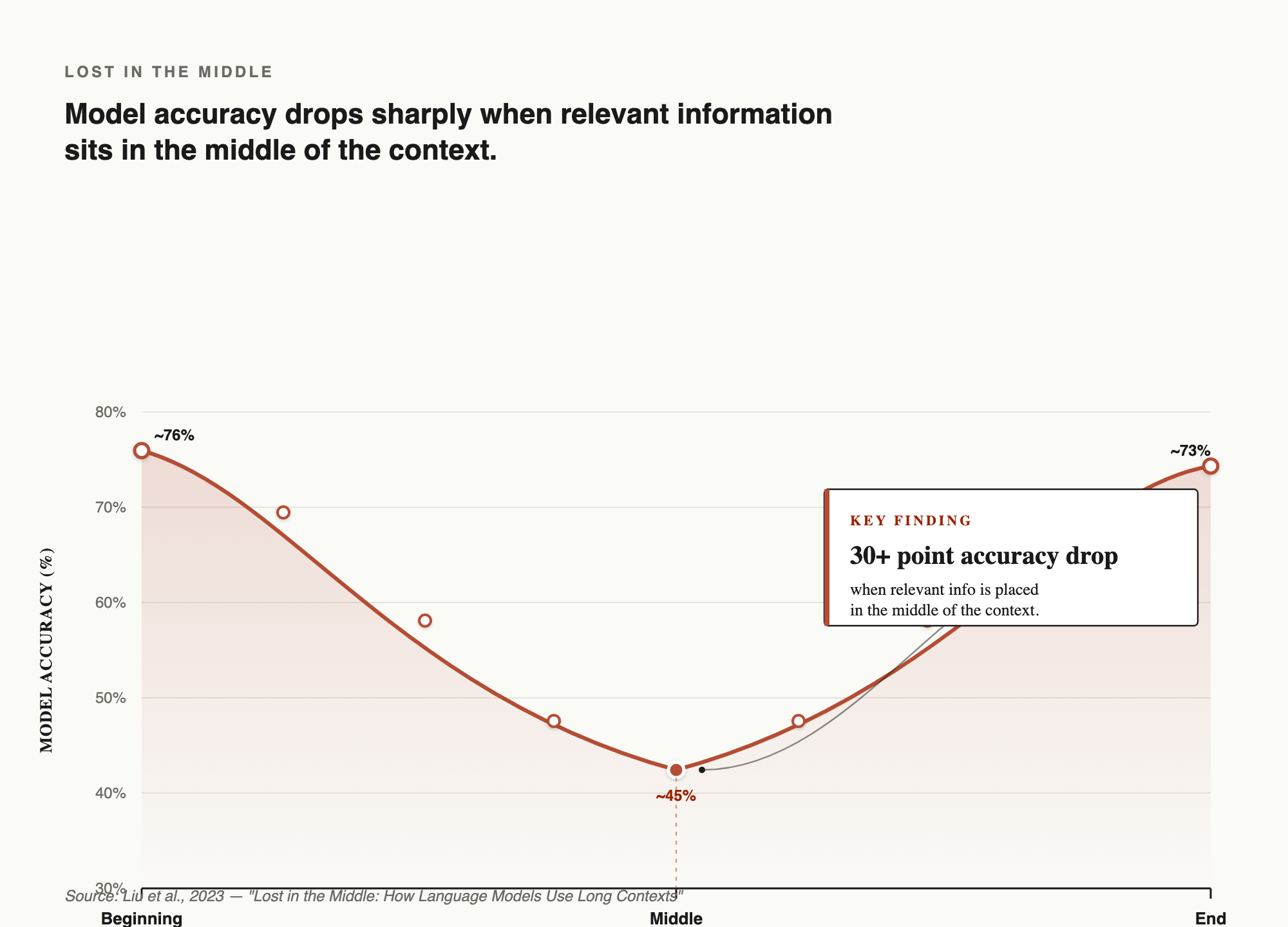
There's a second, subtler problem. Research from Stanford and UC Berkeley (Liu et al., 2023) found that LLMs don't pay equal attention across the full context they show a U-shaped attention curve. Information at the very beginning and very end of the context is recalled well. Information in the middle gets systematically missed.
The study measured an accuracy drop of over 30 percentage points when the relevant piece of information moved from the beginning to the middle of the context. In some cases, models performed worse than if they'd been given no documents at all.
Think about what this means in practice: if your original instructions are buried under 40,000 tokens of code and conversation history, the model has effectively forgotten them even though they're technically still "in" the context.
This mirrors the serial-position effect in human psychology people also remember the first and last items in a list better than items in the middle. LLMs have the same bias, baked in architecturally.
What this means for how you structure prompts:
- Put the most important information first and last not in the middle.
- If you have a long prompt, repeat your key question or constraint at both ends.
- Don't assume the model read everything just because you pasted everything.
What's Actually Filling Your Context Window?
Before you can manage context well, it helps to understand what's competing for space. In a typical AI-assisted test automation session, the context contains some mix of:
Your instructions what you asked the model to do, including any system prompt or persona settings. Can be a few lines or several pages.
Conversation history every message exchanged in the session. Grows with every turn, never shrinks unless you start fresh.
Code and files you've shared a single Playwright test file is manageable; a full test suite is not.
Tool outputs — when an AI agent reads a file, runs a search, or calls an API, that result lands in the context. These accumulate fast during long sessions.
Retrieved documents content pulled from a knowledge base, a spec, or a web search.
The model's own responses generated content counts too, including any reasoning the model writes out.
All of these compete for the same fixed space. In a long session, conversation history and tool outputs tend to dominate and they push your original instructions toward that forgotten middle.
What Happens When You Hit the Limit?
When input exceeds the context window, one of three things happens depending on the tool:
Hard error the API rejects the request. At least you know.
Silent truncation the model drops the oldest tokens without telling you, leading to subtly wrong outputs. This is the dangerous case. If you paste a 500-test file and the model silently ignores the last 200 tests, it'll confidently generate analysis based on incomplete data.
Automatic summarization some agent frameworks (like Claude Code) automatically summarize older parts of the conversation to make room. This preserves continuity, but important details can get compressed away in the process.
The worst outcome isn't an error — it's a confident, polished response based on incomplete information.
Claude Code for Playwright — Expert Track
Context Window vs. Memory An Important Distinction
These two get confused all the time, and mixing them up leads to real frustration.
Context window = what the model can see right now, in this interaction. It resets every new conversation. The model has no idea what you discussed yesterday unless you paste it back in.
Memory = external storage that persists across conversations files, databases, dedicated memory systems. LLMs don't have this built in. It requires additional infrastructure, like the memory tools in Claude Code or a workspace index in Copilot.
Every new chat session, the model starts completely fresh. If you asked it to review your test strategy last Tuesday and want to build on that today, you need to bring the relevant parts back into the new context yourself.
Practical Strategies for QA Work
These habits are about managing the model's attention during AI-assisted testing sessions specifically. For the broader set of practices that keep an automation suite healthy in general — locators, page objects, flaky tests, CI — see QA Test Automation Best Practices.
1. Work Narrow, Not Broad
The single most effective habit: ask specific questions about specific things, rather than broad questions about everything at once.
Instead of pasting 300 tests and asking "what's missing?":
"Here are the tests for the login flow only. What edge cases are missing?"
Instead of sharing your whole codebase, share only the file relevant to the question.
2. Put the Important Thing First (and Last)
Given the U-shaped attention curve, position matters. When you have a long prompt:
- Put your key question or the most critical file at the top.
- Repeat your core requirement at the bottom too.
- Don't sandwich the thing you care about between large blocks of unrelated content.
This is one of the highest-leverage habits you can build and it costs nothing.
3. Summarize Before Expanding
Before sending a large document, ask the model to summarize it first, then work from the summary:
"Summarize the key components and their responsibilities in this file.
I'll use this summary as context for follow-up questions."
This is especially useful when you're about to do several rounds of questions on the same codebase.
4. Use Chunking for Large Inputs
Break large inputs into meaningful pieces. Instead of sending an entire test suite at once, send one functional area at a time. Each chunk should be self-contained enough that the model can reason about it independently.
A good chunk size for test automation work is roughly one feature area or one page object — small enough to fit comfortably in context alongside your instructions and conversation history, but large enough to give the model real substance to work with.
5. Understand What RAG Is Doing for You
For large codebases, most professional AI tools (Cursor, GitHub Copilot Workspace, Claude Code) use Retrieval-Augmented Generation (RAG) under the hood. Instead of loading the entire codebase into context, they embed your code into a searchable index and retrieve only the relevant files for each query.
You don't need to build this yourself but understanding it explains why these tools work better on large codebases than simply pasting everything into a chat. When a tool supports workspace-level context, use it rather than manual copy-pasting.
6. Start Fresh When the Task Changes
Context from a previous task actively gets in the way of a new one. When you switch from "write tests for the login page" to "review the checkout flow," start a new conversation. The stale context from the login task isn't helping it's occupying space and potentially pulling the model's attention in the wrong direction.
7. Externalize Your State for Long Tasks
For multi-step work, write your progress and key decisions to a file rather than relying on the model to remember them from 20 messages ago:
"Update plan.md with what we've completed and what's still pending."
Then, when the context gets long, you can start a fresh session and hand it that file — instead of hoping it remembered something from the middle of a long conversation.
The Context Window Is Your Budget
Think of the context window as expensive real estate. The more you put in:
- The more expensive the API call (you pay for input tokens)
- The slower the response (everything gets processed before the model replies)
- The higher the risk of the model losing focus or missing key details
The goal isn't to fill the window it's to fill it with the right things.
A 200K token window sounds enormous until you're two hours into a session with an AI agent that's been reading files, running searches, and building up conversation history. Managing that budget deliberately through selective input, timely summarization, and fresh sessions when appropriate is what separates effective AI users from frustrated ones.
Key Takeaways
- Context windows are finite, and quality degrades well before the hard limit aim to stay below 40–60% for reliable work.
- The "lost in the middle" effect is real: put critical information at the top and bottom of long prompts, not buried in the middle.
- Everything in a session competes for the same space: your instructions, conversation history, files, and tool outputs.
- Silent truncation is more dangerous than an error you won't know what the model missed.
- Context window ≠ memory. Every new session starts fresh.
- Work narrow: specific questions, chunked inputs, summarize before expanding, fresh session when the task changes.
📚 Academic & Professional Resources
Core Research Papers
Liu, N. F., Lin, K., Hewitt, J., Paranjape, A., Bevilacqua, M., Petroni, F., & Liang, P. (2023). "Lost in the Middle: How Language Models Use Long Contexts." Transactions of the Association for Computational Linguistics, vol. 12 (2024), pp. 157–173. arXiv:2307.03172 · Code & Data The landmark study on attention degradation in long contexts. Tested GPT-3.5-Turbo, GPT-4, Claude-1.3, MPT-30B, and LongChat on multi-document QA and key-value retrieval. Found the U-shaped accuracy curve — performance drops sharply when relevant information sits in the middle of the context, sometimes below the model's closed-book (no documents) baseline. Over 2,500 citations. The most important single paper on context window behavior.
Industry Research
Hong, K. et al. / Chroma Research (2025). "Context Rot: How Increasing Input Tokens Impacts LLM Performance." Evaluated 18 frontier models including Claude 4, GPT-4.1, and Gemini 2.5. Found consistent quality degradation as context filled — across all models, and often well before the stated limit. The source of the "context rot" term and the 40–50% degradation threshold.
Anthropic. (2024). "Introducing Contextual Retrieval." anthropic.com/news/contextual-retrieval Describes a technique of prepending short, document-aware context blurbs to each chunk before embedding. Reported a 49% reduction in retrieval failures combined with BM25; 67% when a reranker is added on top.
Anthropic. (2025). "Effective Context Engineering for AI Agents." anthropic.com/engineering Anthropic's official engineering blog post defining context engineering as "curating and maintaining the optimal set of tokens during LLM inference." Introduces the strategies of compaction, note-taking, sub-agent architectures, and just-in-time retrieval.
Claude Code for Playwright — Expert Track